What's new
TackNote for Mac release notes
Every version of TackNote for Mac, and what changed.
1.4.5
October 8, 2026LatestThe video plays from YouTube. Nothing loads from YouTube until you press play.
- Hide notes when sharing my screen. A new setting in Settings, General keeps your notes and TackBoard out of screenshots and out of screen sharing. With Zoom and Google Meet sharing the whole screen, your notes stay off the call. Some recording tools can still see them, so before an important call or recording, try a quick test share first. The setting is off until you turn it on, and private notes are always hidden.
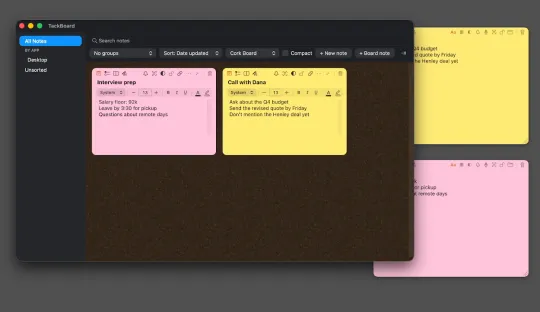
Setting off: the recording shows your notes and TackBoard. 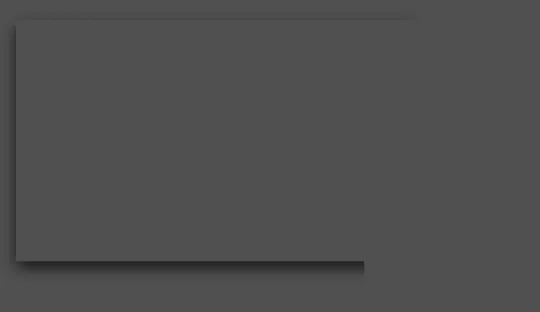
Setting on: the same recording shows neither. - End-to-end encrypted sync for everyone. iCloud sync now seals each note on your Mac before it leaves, whether or not you use Advanced Data Protection.
- Your license works offline for 60 days. An activated license now keeps working for 60 days after its last check with our server, and every check starts a new 60 days. In the last 7 days TackNote asks you to connect once. After 60 days your notes stay readable, and you can still copy and export them, until your Mac connects again.
- Private projects from your PC. When a Windows PC that shares a sync folder with your Mac marks a project private, your Mac keeps it private too. Making such a project public on your Mac now asks first.
- Various fixes and improvements.
1.4.4
October 6, 2026- Hotfix: Text Color, Font and Size change the text of your note again. In 1.4.3, choosing a color only changed the blinking cursor.
- A formatting bar. Click the Aa button on a note's toolbar for font, size, bold, italic, underline, text color and highlight, all one click away. Select some words to change just those, or change the whole note with nothing selected. Text color and highlight open a grid of colors, with Custom for any color at all.
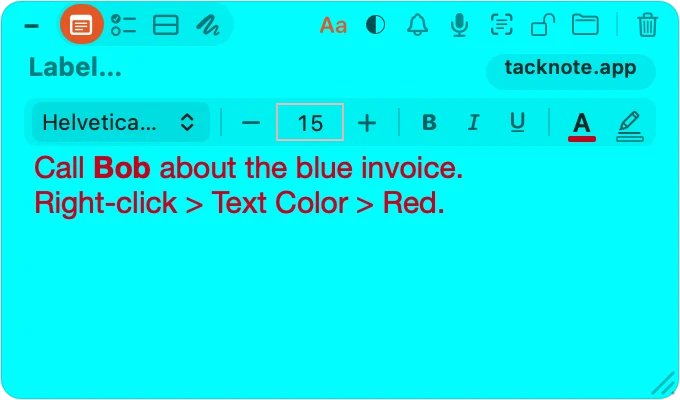
Red means red again, and the formatting bar sits right above your text. - Various fixes and improvements.
1.4.3
October 2, 2026- Hotfix: in Slack, a conversation's "1 note" tag could stay on top of a picture or file you opened. Tags now step out of the way while something covers the sidebar and come back when you close it.
1.4.2
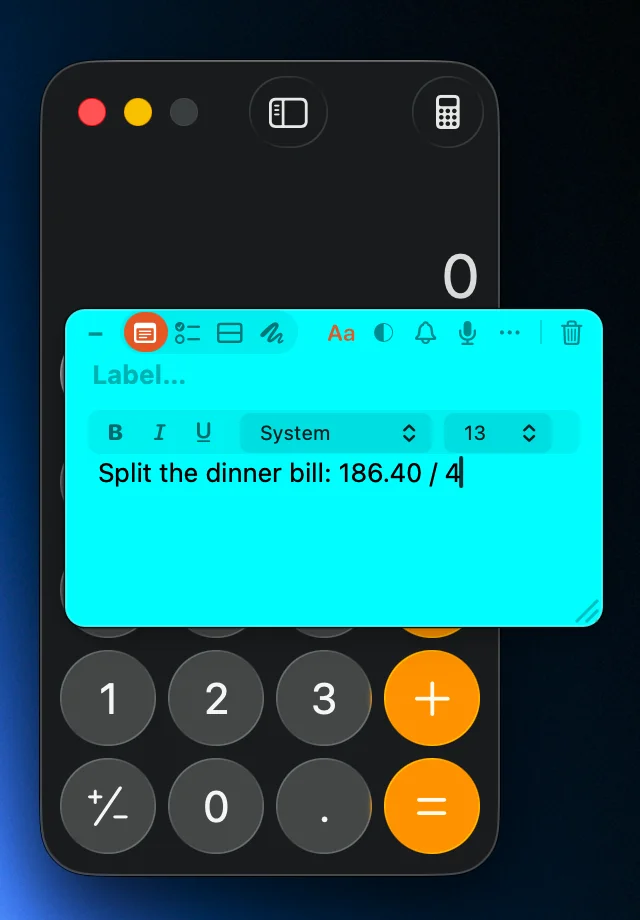
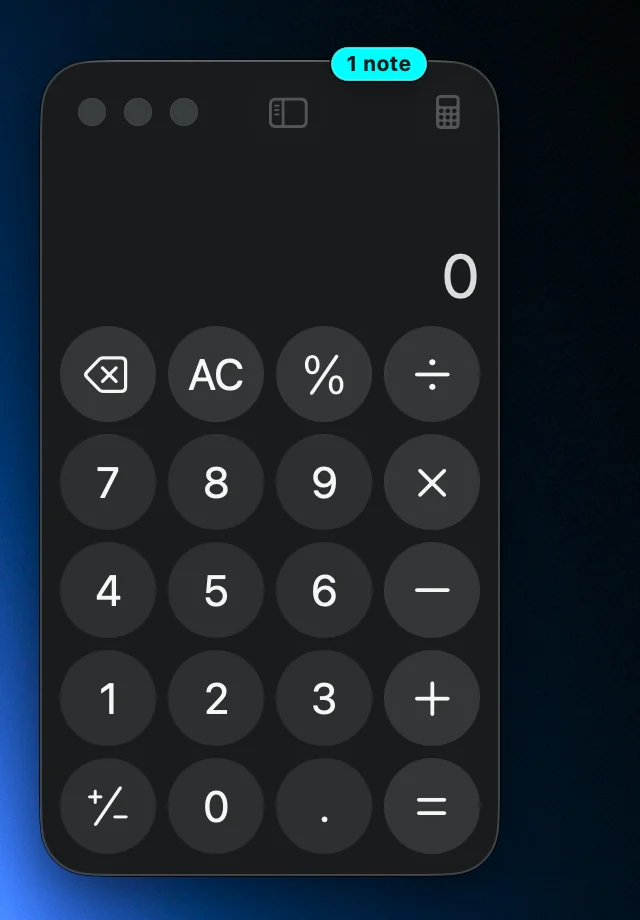
October 2, 2026- See where your notes are waiting. When you click into another app, a note steps aside so it never covers your work. Now the window it belongs to keeps a small "1 note" tag on its top edge, in the note's own color, so you can see at a glance where your notes are. Click the tag and that window comes to the front with its notes. A window behind another window keeps its tag behind it too, so tags never float over the app you are using.
- Tags on browser tabs. In Safari, Google Chrome and Firefox the tag sits on the note's own tab, and clicking it opens that tab.
- Tags in Slack and Microsoft Teams. A note on a channel, chat or direct message puts its tag right next to that conversation in the sidebar, and the window shows how many notes it holds in all. Click a conversation's tag to open it. Tags fade out while you scroll a sidebar and come back once it stops.
- Folders and documents too. Notes on Finder folders, Messages conversations and documents tag the window that shows them.
- Your choice. Tags are on by default. To turn them off, open Settings and clear Show note pills.
- Fixed: a note stuck to a Slack channel could disappear whenever a mention or direct message was waiting, and stay hidden until everything was read. It now stays with its channel, and notes that went missing this way come back on their own.
- Various other fixes and improvements.
1.4.1
September 30, 2026- Sync your notes between Mac and Windows. Your Mac and your Windows PC can now share notes through a folder you already sync between them, such as one in iCloud Drive, OneDrive, Dropbox or Google Drive. On your Mac, open Settings, choose Sync with Windows, pick that folder and choose a passphrase. On your PC, open TackNote's Settings, go to Sync, choose the same folder and enter the same passphrase. Notes arrive with their pictures, voice recordings and videos. Everything kept in the folder is encrypted with your passphrase, and private notes never leave the computer they were written on.
- A note for one browser tab. When the same page is open in more than one Chrome tab, TackNote asks whether a new note is for this tab only or for every tab with that page. A note already on the page can be tied to its tab with This Tab Only in its right-click menu. You can have TackNote remember your answer, and change it in Settings under Same page in several tabs. Chrome forgets which tab is which when it quits; when it reopens your tabs, each note goes back to the tab in the same position. In Safari and Firefox a note still belongs to the page, as before.
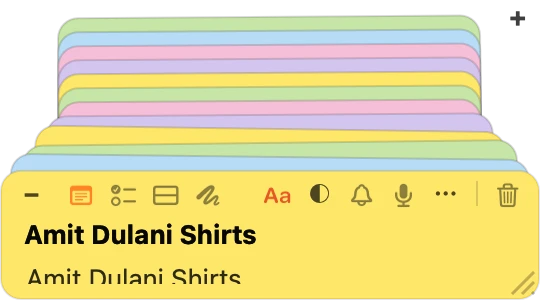
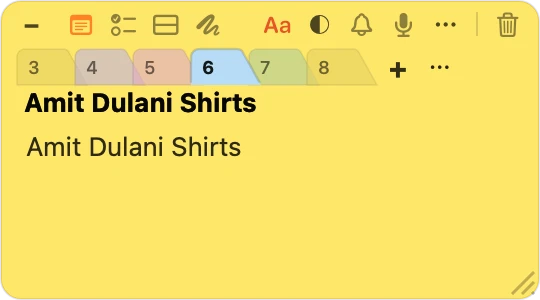
- Every stack of notes is tabbed. A stack of any size now shows tabs across the top. When there are too many for names to fit, the tabs show numbers, and a tab marked with three dots lists every note in the stack so you can jump straight to one. The stacked paper look for big stacks is gone, so every stack works the same way, including stacks you made before this update.
- Notes keep up with your browser tabs. Switch tabs and the note for the page you left goes away at once, and the note for the page you arrived on appears right behind it. Heavy pages used to leave a note lingering for a moment.
- TackNote asks before copying text out of a picture. Drop or paste an image onto a note and TackNote shows the text it found and asks whether to copy it into the note or keep just the picture. You can have it remember your answer, and change it later in Settings under Text in dropped images. Capturing text from the screen works as before.
- Pictures and videos tell you how to remove them. Hover over a picture or video on a note and TackNote tells you what a click and a right-click do.
- Lighter on your Mac. TackNote uses far less processor time while a browser is in front.
- Float Above All Windows is now called the same thing in the note's menu, in Settings and when you make your first desktop note.
- Fixed: a minimized note could show its text, checkboxes or sketch colours through the pin. Shrinking a note with pictures on it could put the thumbnails on top of the toolbar and squeeze the text to a sliver; a small note now keeps its toolbar, its title and at least a line of text. The last step of the walkthrough pointed at TackBoard instead of the note it was describing.
- Various other fixes and improvements.
1.4.0
September 28, 2026- Getting ready for TackNote on iPhone and Android. Both phone apps are coming soon, to the App Store and Google Play. This release prepares your Mac for them.
- Notes that live on TackBoard only. Click + Board note on TackBoard, or press Shift Command N with the board open, for a note that is not stuck to any window, page or folder. It sits on the board like any other card and you type straight into it. When you want it somewhere after all, right-click the card and choose Re-stick.
- Ready for TackNote on your iPhone. TackNote for iPhone is coming soon to the App Store. When it arrives, notes you make on your phone come to your Mac, encrypted, through your own iCloud, and wait on your TackBoard in a folder called From phone. Their pictures, voice recordings and transcripts come with them, and so does video, which plays right on the note.
- Your Mac notes stay where they are. Notes you write on the Mac, notes you imported, and notes floating on your desktop stay on this Mac, exactly as before. Notes in a private folder never leave the Mac they were written on.
- Backups include video. Export All and Import carry the videos on your notes along with everything else.
- Various other fixes and improvements.
1.3.4
September 23, 2026- Stacked notes are tabbed now. A stack of notes shows a row of tabs across the top, each carrying that note's name, so you can tell them apart and jump straight to the one you want. It works however your notes are coloured, including when they are all the same colour, which is where a row of identical swatches used to leave you hovering over each one to find out what it was. Past five notes a name no longer fits on a tab, so the stack goes back to showing layered cards instead.
- Peeling a note off a stack takes a deliberate hold. Press and hold a tab, then drag, and the tab lifts and follows your cursor so you can see what is happening before you let go. A quick click still just flips to that note. Dragging no longer pulls a note out of a stack by accident.
- A way to unstick a note. A note tacked to a window has a new Unstick option in its menu. It releases the note where it sits and turns it into a desktop note, which is the way back to Float Over All Apps and Show on All Desktops.
- The tabs follow your theme. Whichever look you have chosen, the tabs are drawn to match it, down to the paper grain on the paper themes and the halftone on Comic.
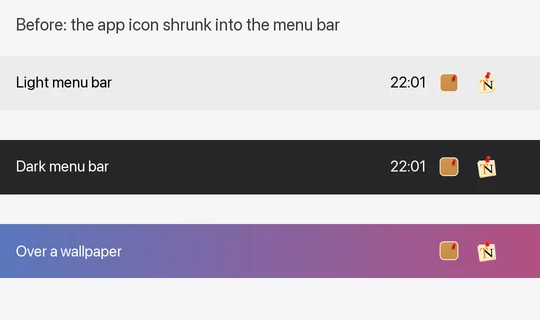
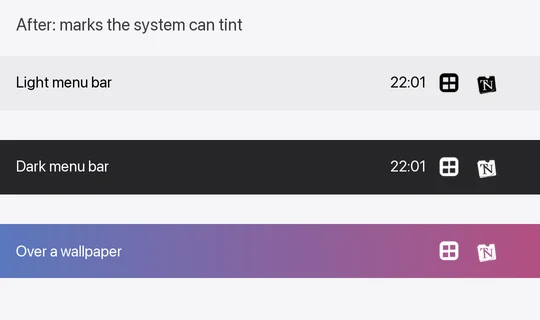
- New marks in the menu bar. TackNote's two menu bar icons are drawn the way macOS expects now, so they follow your menu bar instead of sitting on top of it. They turn dark on a light menu bar and light on a dark one, and they stay readable over any wallpaper. It is the same mark, just clearer at that size.
- Fixed: a tab on a stacked note needed two clicks before it responded, and dragging one off needed a second press. Switching your theme left the tabs looking like the old one until you clicked a tab.
- Various other fixes and improvements.
1.3.3
September 18, 2026- One keypress makes one note. If your shortcut for a new note matched one TackNote already uses in its own menus, pressing it while the TackBoard window was in front could create two notes at once. It now makes one, whichever window you are in.
- Shortcuts tell you when one is already taken. Recording a shortcut that another TackNote action already owns is now refused, and TackNote names the action that holds it. Two actions can no longer answer the same keypress.
- Fixed: a shortcut that did not save could still be announced as changed, which left the app and the Shortcuts window disagreeing about what was set.
1.3.2
September 17, 2026- Pictures stay on your notes. Capture part of your screen into a note, or paste and drop pictures straight in, and they stay there as thumbnails along the bottom. Click one to see it full size, or right-click for Copy Image and Delete Image. TackNote still reads any text in the picture so you can search for it later, and now you keep the picture too. Pictures are encrypted on your Mac the same way your notes are.
- Bullet lists. Press Command Shift 8 to turn the current line, or everything you have selected, into a bullet list. Press it again to turn it off. Works in a note and on a TackBoard card.
- Better snoozing on reminders. When a reminder arrives at the wrong moment, you can snooze it for an hour, until tomorrow at the same time, or until next week at the same time, straight from the notification.
- A Permissions tab in Settings. Every permission TackNote uses, whether it is on, what it is for, and a button that takes you to the right place to turn on anything that is off. If you dismissed a permission prompt when you first installed TackNote, this is the way back to it.
- Find your pictures. TackBoard has a new Tacks with Photos filter.
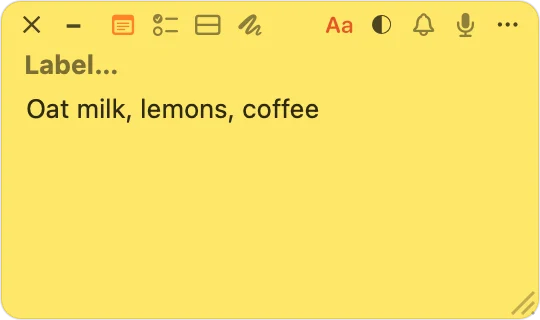
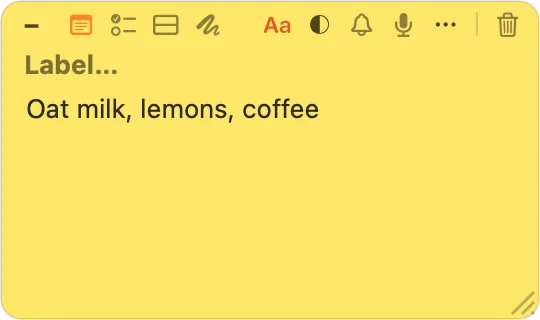
- A clearer way to delete a note. The X at the top left of a note has been replaced by a trash button, set apart on the right. That control always deleted the note, and now it says so. Deleting offers an Undo, and minimizing is still how you get a note out of the way without losing it. The same change is on TackBoard cards.
- Syncing between your Macs. Sync now uses our production iCloud store. If you had sync turned on, the first time you open this version your synced web-page notes upload again so both Macs are working from the same place. Nothing is lost along the way: your notes live on your Mac and sync is a copy of them. Notes carrying a voice memo or a picture now sync properly too.
- Fixed: a note switched to To-do stayed a To-do note even after you emptied it; the formatting bar could stop responding with more than one note open; text captured from your screen into a formatted note could be lost; and the keyboard shortcut could create two notes instead of one.
- Various other fixes and improvements.
1.3.1
September 14, 2026- Much lighter while Finder is in front. With notes tacked to Finder folders, TackNote used to ask Finder which folder it was showing several times a second, and that took a real share of your Mac's processor whenever Finder was the app in front. It now asks when you open a folder, a tab or a window, and uses a small fraction of the power it did.
- Various fixes and improvements.
1.3.0
September 14, 2026- Finder views like Recents now ask where your note belongs. Recents, Shared and AirDrop are not folders, so a note tacked there used to quietly become a desktop note and follow you onto every desktop. Now you choose: stick it to that view, or make it a desktop note.
- Desktop notes can stay on one desktop. Right-click a desktop note and untick Show on All Desktops to keep it off your other desktops and your full-screen apps. It always comes back on the same screen. If you use more than one desktop, which one is remembered until you quit TackNote or restart.
- A note stays with its window. A note tacked to a window no longer shows while that window is on another desktop.
- Notices now show in full. A notice could cut its text off mid-sentence. It now grows to fit, in every language.
- Various fixes and improvements.
1.2.9
September 9, 2026- The trial and license reminders can now be closed. Clicking one no longer opens the License window. The close button is a proper button, and the reminder now sits above your notes so a note can never cover it.
- Various fixes and improvements.
1.2.8
September 3, 2026- Fixed a crash when tucking the board against the top or bottom of the screen. Choosing Top or Bottom closed TackNote immediately. It now works the same as the left and right edges.
- The board tucks away properly on a second monitor. Stashing a board on a Mac with more than one display slid it onto the neighbouring screen in full view instead of hiding it. It now tucks away wherever your displays sit.
- The stash button now lets you choose an edge, and remember it. Clicking it asks which edge you want, so the board never goes somewhere you did not choose. Tick Make Default and it stops asking, and one click sends it straight there. Right-click the button any time to pick a different edge, or to turn the board back into an ordinary window.
- Fixed a crash when using Undo on the board. Pressing Command-Z with TackBoard in front could close TackNote. Each card now keeps its own undo history, so Undo also stops forgetting what you did on one card as soon as you edit another.
- Notes now stick to your code project. In Xcode a note belongs to the project and in VS Code to the workspace folder, so it stays with you as you move between files instead of disappearing when you switch editor tabs.
- Various fixes and improvements.
1.2.7
August 31, 2026- Quitting from the menu bar now always closes TackNote completely.
- Bought before you downloaded? Your purchase page can activate this Mac in one click, and the trial banner now offers "Already bought? Enter your key".
- The walkthrough covers what's new in 1.2.
- Various fixes and improvements.
1.2.6
August 30, 2026- Reminders can now repeat. Set one to repeat every day, every weekday, every week or every month, and it re-arms itself each time it fires. If your Mac was asleep when one came due, it fires when you get back and then carries on from the next real occurrence rather than firing a burst of missed ones.
- TackNote is now fully translated in all 18 languages. The setup walkthrough, Program Themes, board names and sort labels were still appearing in English on non-English systems. They are translated now, so the whole app reads in your language rather than most of it.
- Various fixes and improvements.
1.2.5
August 21, 2026- Moving your license to a new Mac is now one step. A license covers three Macs. When all three were in use, activating a fourth simply refused, and you had to go back to the old Mac and deactivate it first. If that Mac was sold, wiped or broken, you were stuck. Now TackNote shows you which Macs are using the license and lets you pick one to disconnect, and the seat moves across straight away. You never need the old Mac to hand.
- Your license keeps working offline. Checks happen quietly when the app opens, and if we cannot be reached the app carries on normally for about three weeks before it needs to check in again. A short network problem on our side, or yours, will not interrupt an app you paid for.
- Various fixes and improvements.
1.2.4
August 21, 2026- Notes that would not appear now appear. On some Macs a note could stay hidden even though it was still attached to its window, its file, or its page. Nothing was lost and nothing was unpinned, but the note simply never came back on screen. That is fixed. If you have been missing a note since updating, it should be waiting for you.
- Bring a missing note back. If a note is listed in TackBoard but never shows up, right-click its card and choose "Bring to Center of Screen". It moves to the middle of the screen it belongs to and stays attached to whatever it was stuck to. Right-click an empty part of the board for "Find Lost Notes", which does the same for every note that is off screen and leaves the ones you can already see exactly where they are.
- Re-stick leaves the note where you put it. Carrying a note to a new home used to fling it into the corner of the new window, and sometimes somewhere you could not find at all. It now stays where you dropped it.
- Every card has the same menu. Jump to Note, Re-home, Re-stick and Bring to Center are now on every card in TackBoard, not just some of them. Jump to Note also rescues a note that is off screen before it takes you there.
- TackBoard can tuck itself away. Right-click an empty part of the board and choose "Swing Board To" to park it against any edge of your screen. It hides completely and leaves a small paper flag. Hover the flag and the board slides out, pull the flag to open it by hand, or click it to keep it open. Drag the board off the edge to go back to a normal window. You can pick the flag color in Settings.
- The board toolbar stops overlapping. Make TackBoard narrow and the search box used to run underneath the menus beside it. The controls now drop to their own row and search gets the full width.
- Rolling back takes you to the version you were on. If you roll back after an update, you now land on the version you were actually running, instead of an older one.
- Various fixes and improvements.
1.2.3
August 19, 2026- Moving a note to a new home works again. Re-stick carries a note to a different window, tab, page or file without recreating it. The fix in 1.2.2 that stopped notes stranding on the desktop also stopped a note staying on screen while you carried it, so the note disappeared partway through the move. Carrying works again, the note stays put while you navigate, and the banner now waits until you stick the note down or cancel instead of timing out on you.
- Notes no longer flash onto the wrong document. Switching between two documents in the same app could show a note over the document it does not belong to for a moment before it corrected itself.
- Control-click opens a note's menus. If you do not have secondary click switched on, the small icons along the top of a note were out of reach, and Control-clicking the color icon just cycled the color. Control-click now opens the same menus a right-click does.
- We ask about a review once, and only once. If you have had TackNote a couple of weeks and have not written a review, you will see a single dismissible banner. We check first, so nobody who has already written one is asked again.
- Various fixes and improvements.
1.2.2
August 16, 2026- Reminders now arrive as real notifications. A reminder used to show TackNote's own banner, which could appear on another display or behind a full screen window and be gone before you ever saw it. Reminders now come through macOS notifications, so they reach you even when TackNote is closed, and they wait in Notification Center until you deal with them. Each one tells you what the note is stuck to, and you can snooze it or mark it done without opening anything.
- Reminders on stacked notes work. A reminder set on a note behind another in a stack was never actually scheduled. It is now.
- The feedback window shows what you type. On macOS Sequoia, text typed into the feedback and crash report windows was really there but was not being drawn, so the box looked empty. Both windows now show your words, and both can be resized.
- Notes leave with their window. A note could stay behind on the desktop after you closed the window it was stuck to. It now goes when the window goes.
- Various fixes and improvements.
1.2.1
August 14, 2026- No more false crash alert. Restarting or shutting down your Mac could make TackNote think it had crashed, and greet you with an apology it did not owe you. A restart is now recognised for what it is.
- Your mouse-button shortcut works everywhere. If you set an extra mouse button to stick a note, it did nothing while a note had focus. It now works wherever you are.
- Two copies can no longer overwrite each other. If TackNote is installed twice on the same Mac, both copies used the same notes file and whichever saved last won. Only one copy opens your notes now, and the other tells you where the running one is.
- Various fixes and improvements.
1.2.0
July 27, 2026- One press, one note. Holding your shortcut a moment too long could make two notes at once. It now makes exactly one, however long you hold it.
- Notes keep up when you switch tabs. A note tacked to a browser tab now hides and returns the moment you change tabs, instead of lagging behind.
- New Floating Note always floats. Notes you already have keep their own setting, and you can change any of them by right-clicking.
- Copy a whole note anywhere. It arrives formatted in Mail and Pages, as Markdown in Obsidian and Bear, and as plain text everywhere else.
- One Settings window. Everything now lives in one place, including a new Desktop note layer option.
- Various fixes and improvements.
1.1.9
July 24, 2026- Quick math right in your notes. Type something like 12.50 + 4.75 or 10 miles in km and press Return, and TackNote adds the answer for you. It only touches lines that are clearly a calculation, and you can turn it off in Settings.
- Various fixes and improvements.
1.1.8
July 23, 2026- Turn what is on your screen into a note. Select any part of your screen and TackNote reads the text straight into your note, all on your Mac. Use the new capture button on a note, a keyboard shortcut from any app, or just drag or paste a screenshot onto a note.
- Type "todo" to split your note. On its own line, "todo" and Return opens Split view, so your notes and to-do list sit side by side. Your text is never rewritten, and you can turn it off in Settings.
- Make your TackBoard cards your own. Pin the tools you reach for most to every card and tuck the rest into a tidy menu. Open the more menu on any card to choose your favorites.
- Various fixes and improvements.
1.1.7
July 18, 2026- Fixed high CPU use on macOS 15. On Sequoia, TackNote could get sluggish and use a lot of CPU when notes were attached to browser windows. It now stays light and responsive.
- Various fixes and improvements.
1.1.6
July 16, 2026- Color fixes. Custom note colors and TackBoard backgrounds now hold exactly what you pick, and your board background stays put when you close and reopen the board.
- Settings in the right-click menu. Open Settings right from a note or the board.
- Various fixes and improvements.
1.1.5
July 15, 2026- Formatting shortcuts on TackBoard cards. Cmd+B, Cmd+I, Cmd+U, and Tab to indent now work on TackBoard cards too, matching the note editor.
- Various fixes and improvements.
1.1.4
July 15, 2026- Text formatting shortcuts. Press Cmd+B, Cmd+I, and Cmd+U to bold, italic, and underline as you write, and press Tab to indent a line.
- Fixed: custom default note color. Setting a custom default color like white no longer flips new notes to black.
- Various fixes and improvements.
1.1.3
July 14, 2026- Fixed: note text on macOS 15. On macOS 15, text in a note or on a TackBoard card could stay hidden, or wrap oddly, until you resized the note. It now appears the moment you type and wraps correctly.
- A trash bin on your TackBoard. Drag notes onto Recently Closed to delete them, and recover any of them from there whenever you need to.
- Various fixes and improvements.
1.1.2
July 12, 2026- Priority flags. Mark your most important notes with a flag, or a double flag for high priority. It shows right on the note and its TackBoard card, and you can sort your board by priority to bring what matters to the top.
- Choose your board background. Give your TackBoard the look you want: classic cork, blackboard, whiteboard, cardboard, or any custom color you like.
- Compact board view. Switch your TackBoard to a denser, at-a-glance layout with smaller cards, so you can see more of your notes at once.
- Tidy desktop notes into a grid. Snap your loose desktop notes into a neat grid with one tap, so a cluttered desktop lines right up.
- Jump to the exact email. Notes you tack to a message in Apple Mail now open that exact email when you reveal them, and email notes show who it is from and when, so recurring messages are easy to tell apart.
- Better eM Client support. Notes now stick to your eM Client emails properly, so they follow the right message and reveal it when you need it.
- Various fixes and improvements.
1.1.1
July 9, 2026- Hotfix after 1.1.0. A quick follow-up that cleans up a batch of interface and behavior issues that were missed in the 1.1 release, so formatting, multi-monitor note placement, and note stacking all work as they should.
- Various fixes and improvements.
1.1.0
July 8, 2026- Program Themes. Choose how TackNote looks: keep the Classic design, or switch to the new Modern one. Settings, your corkboard, and your floating notes all restyle together, and your notes carry right over.
- Rich text formatting. Select any text and style it with bold, italic, underline, font, and size, right on your notes and on your TackBoard cards.
- Nested to-dos. Press Tab to turn any checklist item into a sub-task, and Shift-Tab to move it back out. Check off a parent and its sub-tasks check off too. Perfect for breaking a task into steps.
- Various fixes and improvements.
1.0.9
June 26, 2026- TackNote now speaks your language. The whole app is translated into 18 languages (German, French, Spanish, Portuguese, Italian, Dutch, Polish, Turkish, Russian, Ukrainian, Japanese, Korean, Simplified and Traditional Chinese, Hindi, Bengali, and right-to-left Arabic and Urdu) and follows your Mac's language automatically. The website is now fully localized too.
- Markdown formatting. Write in Markdown and your notes render it as you go: headings, bold, lists and links, with the raw text right there the moment you click in to edit. Renders on your TackBoard cards too.
- A “✓ To-dos” view. A new smart filter in TackBoard gathers every open to-do from across all your notes into one place, and each note now has clean Notes and To-do tabs.
- Various fixes and improvements.
1.0.8
June 22, 2026- Fixed: a crash partway through updating. A few people hit a crash mid-update because the app was being replaced while it was still running. Updates now quit and relaunch TackNote cleanly for you. It just blinks and comes right back. New installs were never affected, and our apologies if this caught you mid-update.
- Various fixes and improvements.
1.0.7
June 19, 2026- Fixed: private notes could lose their text. We found a bug in 1.0.6 where locking and then unlocking a private note could blank its body, and that empty state could save over your text. It's fixed: private notes now keep their content safely through the lock screen. Our sincere apologies if this affected you.
- Various fixes and improvements.
1.0.6
June 19, 2026- Jump back to your work. Every note now shows a small pill with what it's tacked to. Click it to open that exact tab, file, folder, or DaVinci project. Your notes become navigation.
- Whole-page notes, fixed. Notes set to "Whole Document" or "Whole Gmail page" once again appear across every tab of a spreadsheet and every email, not just the one they were stuck on.
- A calmer board. Sticking a note no longer pulls TackBoard to the front.
- Reminders that catch your eye. A fired nudge now gently pulses so you spot it even on a small note.
- Smarter re-stick. Carrying a note onto a different app or browser window now binds it to the right one.
- Various fixes and improvements.
1.0.5
June 17, 2026- Universal app. TackNote now runs natively on both Intel and Apple Silicon Macs.
- Smoother updates. A built-in updater installs new versions for you. No more downloading and dragging by hand.
- Mouse-button shortcuts. If you assign a mouse button to stick a note, it no longer triggers the button's old action too.
- Various fixes and improvements.
1.0.4
June 16, 2026- Cleaner text wrapping. Notes now wrap by whole words at any width, with no more mid-word breaks when a note gets narrow.
- Trial reminders. A gentle heads-up as your free trial winds down. Your notes are always safe and yours to read. A license just unlocks creating new ones and exporting.
- Various fixes and improvements.
1.0.3
June 15, 2026- Crash-safe restart. If TackNote ever closes unexpectedly, the next launch offers to send a quick report, and you see exactly what's sent first (never your note contents). If it happened right after an update, you can also roll back to the previous version in one click. Your notes are never touched.
- Various fixes and improvements.
1.0.2
June 15, 2026- Send Feedback, built in. Report a bug or suggest an idea right from the app: press ⌘⇧F or use the menu bar. We read every one.
- Automatic backups. TackNote now snapshots your notes on a schedule (daily by default), on top of the mirror it already takes before every update. Manage it in Settings → Data.
- Safe Mode rollback. If an update ever feels off, roll back to the previous version in one click from the menu bar. Your notes are never touched.
- Desktop notes, refined. Choose whether a desktop note floats over everything or sits on the desktop, with smarter placement across multiple monitors.
- Various fixes and improvements.
1.0.1
June 14, 2026- Privacy & polish. Refinements across private notes and TackBoard, plus various fixes and improvements.
1.0
June 14, 2026- Guided first-run walkthrough. A friendly tour spotlights every control on a note (views, voice, reminders, privacy, projects and color) one at a time, then walks you into TackBoard.
- Smarter note placement. Notes (and the walkthrough's demo tack) now land on the display you're actually using, instead of stranding on the seam between two monitors.
- Self-serve license recovery. Lost your key? Have it sent to you again, with no email to support needed.
- Polish. Clearer wording throughout the onboarding and on the controls.
0.2
June 2026- Import your notes. Bring them in from Apple Notes, Stickies, Evernote, and text or Markdown files.
- A faster TackBoard. The board is quicker, and its cards show more.
- Jump to an iMessage thread. Plus private-note polish and built-in update checking.
- Encrypted iCloud sync for web-page notes. Everything else is encrypted at rest on your Mac.